Place your trade at your chosen price level. Let TAQ Magic Keys execute automatically when the candle confirms your entry condition.
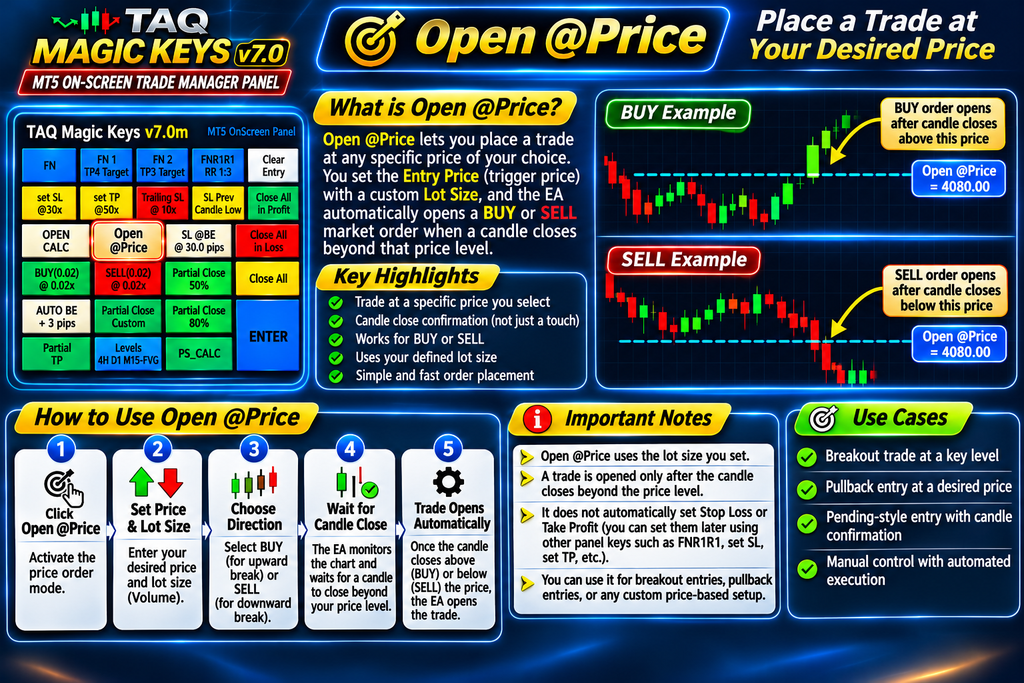
Open @Price is an automated trade-entry feature in TAQ Magic Keys v7.0 for MetaTrader 5. It allows traders to specify a target price, choose a BUY or SELL direction and wait for a candle to close beyond that price.
Instead of continuously watching the market and manually clicking BUY or SELL, the EA monitors the selected price level and automatically executes the trade when the candle-close condition is satisfied.
How Does Open @Price Work?
Step 1 – Activate Open @Price
Click the Open @Price button on the TAQ Magic Keys panel. A small settings window appears on your MT5 chart.
Step 2 – Enter Your Trading Details
Enter two values:
- Target Price: The price level you want the market to cross.
- Lot Size: Your desired trading volume.
Step 3 – Select BUY or SELL
Choose your trade direction:
- BUY: The EA waits for a candle to close above your target price.
- SELL: The EA waits for a candle to close below your target price.
Step 4 – Adjust the Trigger Level
After selecting BUY or SELL, a horizontal trigger line appears on the chart.
You can drag this line to adjust your target price without reopening the settings window.
Step 5 – Automatic Trade Execution
The EA monitors every completed candle on your current chart timeframe.
- For BUY, if the previous candle closes above the selected price, a BUY market order is executed at candle closing price.
- For SELL, if the previous candle closes below the selected price, a SELL market order is executed at candle closing price.
Once the order is successfully executed, Open @Price automatically disarms and removes its trigger line.
Practical Example
Suppose XAUUSD is currently trading at 4,000 and you want to enter a BUY trade only after the market confirms a breakout above 4,020.
- Activate Open @Price.
- Enter target price: 4,020.
- Enter lot size: 0.02.
- Select BUY.
- Wait for a candle to close above 4,020.
If a candle closes at 4,022, the EA automatically executes a BUY market order.
If the price only touches 4,020 but the candle closes below it, no trade is executed.
Important notes for customers
- Uses the lot size entered by the trader.
- Requires a candle CLOSE beyond the trigger level; touching the level is not sufficient.
- Executes a market order, not a broker-side pending order.
- Does not automatically attach Stop Loss or Take Profit.
- You can use other TAQ Magic Keys features to manage the opened trade, including FNR1R1, Auto BE, Trailing SL and Partial Close.
Best trading applications
- Breakout trading after candle-close confirmation.
- Entering trades after price crosses an important support or resistance level.
- Automated entries at manually selected price levels.
- Price-based trading strategies without continuously monitoring the chart.