Plan Your Trade. Calculate Your Risk. Execute with Confidence.
OPEN CALC is an intelligent risk-management and trade-entry feature built into TAQ Magic Keys v7.0 for MetaTrader 5. It helps traders determine their position size, define their Entry Price, Stop Loss and Take Profit and calculate the potential financial risk before placing a trade.
Everything is displayed directly on your MT5 chart, allowing you to visually plan and adjust your trade without using an external calculator.
How Does OPEN CALC Key Work?
Step 1 – Activate OPEN CALC
Click the OPEN CALC button on the TAQ Magic Keys v7.0 panel.
Three interactive horizontal lines will appear on your chart:
- ENTRY (Aqua): Your planned trade entry price. Float with current price until execution.
- STOP LOSS (Red): Your maximum planned loss level. Default 40pips
- TAKE PROFIT (Green/Blue/Purple): Your target profit level. Default RR 1:2
The initial setup uses your configured default Stop Loss and Risk-to-Reward settings. Can change from INPUT setting
Step 2 – Select BUY or SELL
Once your levels are ready, select the trade direction using the existing BUY or SELL button on TAQ Magic Keys v7.0.
- Click BUY for a bullish trade.
- Click SELL for a bearish trade.
OPEN CALC automatically adjusts the Stop Loss and Take Profit orientation according to your selected direction.
Step 3 – Adjust Your Trade Levels
You can drag the Entry, Stop Loss and Take Profit lines directly on the chart to choose your preferred trading levels.
When you change the Entry or Stop Loss level, the Take Profit is recalculated automatically according to your configured Risk-to-Reward ratio. You can also manually adjust the Take Profit line.
When you change the Stop Loss level, the Lot size is recalculated automatically according to your configured Account Risk selected.
Smart Entry Feature: Initially, the Entry, SL and TP levels follow the live market price. If you manually drag the Entry line, live-price following is disabled, allowing you to plan a pending order at your selected price.
Step 4 – Automatic Lot Size Calculation
OPEN CALC automatically calculates your position size using:
- Current Account Balance
- Configured Risk Percentage
- Entry Price
- Stop Loss Distance
- Trading Symbol and broker contract specifications
You don’t need to calculate lot size manually.
The chart displays your calculated lot size, estimated financial loss at Stop Loss and estimated profit at Take Profit.
Step 5 – Review and Execute
Before placing the order, review the information displayed on your chart:
- Trade Direction (BUY/SELL)
- Entry Price
- Stop Loss Price
- Take Profit Price
- Calculated Lot Size
- Estimated Money at Risk
- Estimated Potential Profit
When everything is correct, press the ENTER button to execute Trade.
TAQ Magic Keys automatically determines whether to place a market order or a pending order (Buy Limit, Buy Stop, Sell Limit or Sell Stop), depending on your selected Entry Price relative to the current market.
Your order is submitted with the calculated volume, Stop Loss and Take Profit.
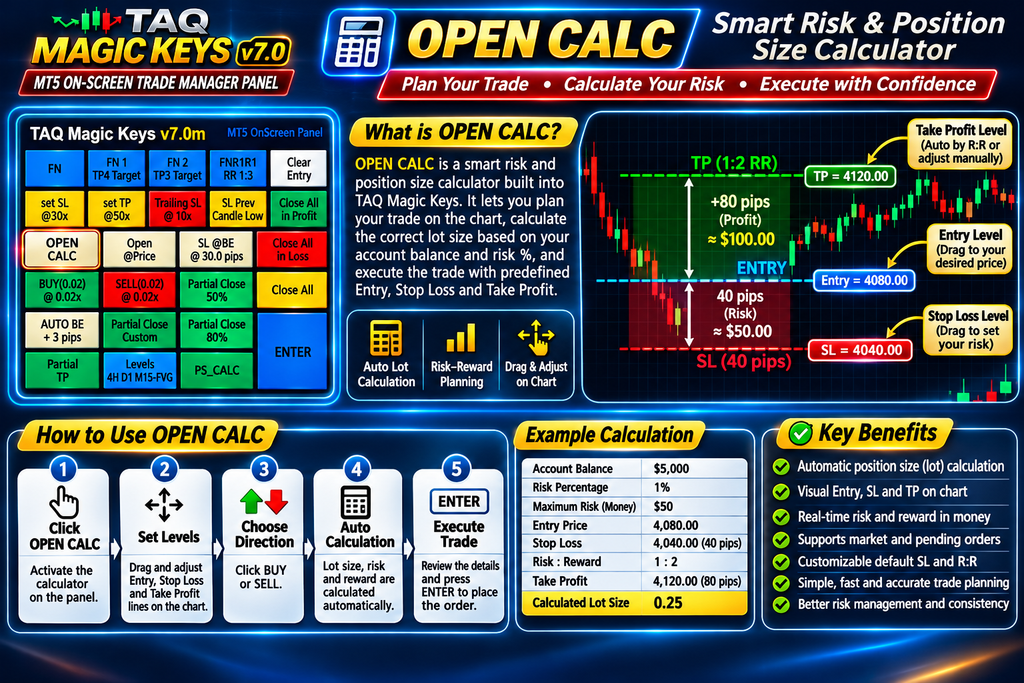
Visual Risk & Reward Display
OPEN CALC makes risk management easier through visual chart representation.
- Red shaded area: Represents the potential loss between Entry and Stop Loss.
- Green shaded area: Represents the potential profit between Entry and Take Profit.
- Lots label: Displays the calculated trading volume.
- SL Money: Shows the estimated financial loss if Stop Loss is reached.
- TP Money: Shows the estimated financial profit if Take Profit is reached.
After successful order placement, the risk and reward chart drawing remains visible while the associated OPEN CALC trade or pending order is active.
Practical Example
Suppose your trading account has a balance of $5,000 and you want to risk only 1% on a trade.
| Trading Information | Example |
|---|---|
| Account Balance | $5,000 |
| Risk Percentage | 1% |
| Maximum Planned Risk | $50 |
| Entry Price | 4,000 |
| Stop Loss | 40 pips away |
| Risk-to-Reward | 1:2 |
| Target Profit | 80 pips away |
| Calculated Lot Size | Automatically calculated |
| Estimated Potential Profit | $100 |
In this example, OPEN CALC calculates the lot size so that the estimated loss at Stop Loss is approximately $50 and the potential profit at Take Profit is approximately $100, before trading costs.
The actual lot size depends on the trading instrument and broker contract specifications.
OPEN CALC Settings
Traders can customize the default calculation settings from the EA Inputs.
| Setting | Default Value | Description |
|---|---|---|
| OPEN CALC Enabled | True | Enable or disable the feature |
| Default Stop Loss | 40 Pips | Initial Stop Loss distance |
| Risk Percentage | 1% | Percentage of account balance to risk |
| Reward Risk Ratio | 2.0 | Default 1:2 Risk-to-Reward |
These settings provide a starting configuration and can be changed according to your trading strategy.
Why Use OPEN CALC?
- No external lot-size calculator required.
- No manual position-size calculations.
- Visual Entry, SL and TP adjustment directly on the chart.
- Automatic lot-size calculation based on account balance and risk.
- Live estimated loss and profit displayed before execution.
- Supports market and pending order placement.
- Helps maintain consistent risk management across trades.
Trade Smarter with TAQ Magic Keys v7.0
OPEN CALC gives traders greater control over their trading decisions by combining trade planning, position sizing, risk calculation and order execution into one convenient MT5 on-screen panel.
Know your risk before you enter the market.