What is the PS_CALC Key?
The PS_CALC (Position Size Calculator) Key in the TAQ Magic Keys panel is a powerful risk management tool that helps traders calculate the correct lot size before opening a trade. Proper position sizing is one of the most important aspects of professional trading because it helps control risk and protect trading capital.
When the PS_CALC button is pressed, a trade calculator panel appears on the screen, allowing traders to quickly determine the appropriate lot size based on their risk settings. By entering key values such as Stop Loss pips, Risk Percentage, and Contract Size, the calculator automatically determines the correct lot size for the trade.
This feature ensures traders follow proper risk management without needing to perform manual calculations.

Introduction of the PS_CALC Key
Many traders struggle with determining the correct lot size for their trades. Entering a trade with an incorrect position size can lead to excessive risk or reduced profit potential.
The TAQ Magic Keys PS_CALC Key simplifies this process by providing an integrated calculator directly on the trading panel. Instead of using external tools or manual calculations, traders can calculate their trade size instantly within the platform.
The calculator automatically retrieves the current account balance, making the process even faster and more accurate.
This feature is particularly useful for traders who want to maintain consistent risk management across all trades.
Function of the PS_CALC Key
The main function of the PS_CALC Key is to calculate the optimal lot size based on the trader’s risk parameters.
When the button is pressed:
- A trade calculator panel appears on the screen
- The account balance is automatically detected
- Traders enter the required inputs
Required inputs include:
- Stop Loss (SL) in pips
- Risk percentage (%)
- Contract size
After entering these values, the calculator automatically determines the correct lot size for the trade.
This ensures that the trader’s risk remains consistent according to their trading plan.
How to Use the PS_CALC Key
Using the PS_CALC Key in TAQ Magic Keys is simple and efficient.
Step-by-step process:
- Click the PS_CALC button on the Magic Keys panel.
- The position size calculator panel will appear on the screen.
- Enter the following information:
- Stop Loss (SL) in pips
- Risk percentage (%)
- Contract size
- The account balance will automatically be retrieved by the calculator.
- The calculator will instantly display the recommended lot size for the trade.
Traders can then use this calculated lot size when placing their trade.
Position Size Calculator
TAQ Magic Keys v5.0 has this strongest feature. The Position Size Calculator helps traders determine the correct lot size based on risk percentage and stop loss, so every trade is controlled and consistent.
Instead of guessing lot size, the calculator automatically tells you:
- ✔ How many lots to trade
- ✔ How much money you are risking
- ✔ How many units you are trading
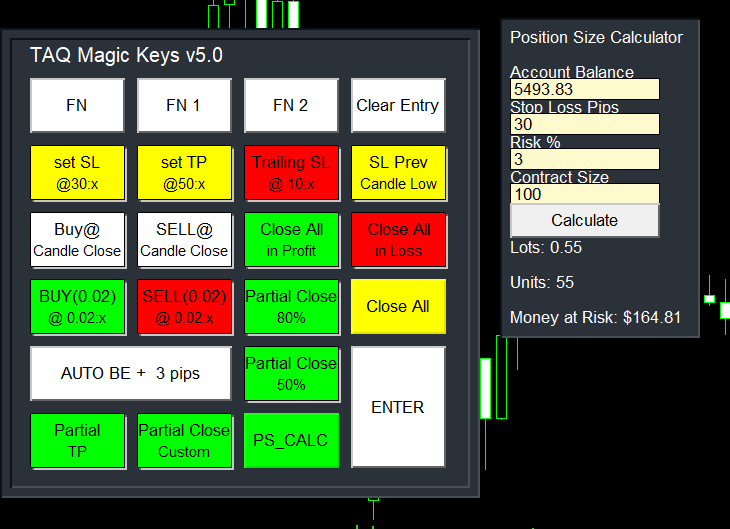
⚙️ How It Works (Easy)
It need only 4 values:
1️⃣ Account Balance
Automatically pick your current trading balance
Example: $5493
2️⃣ Stop Loss (Pips)
Enter your SL here
What is your SL for trade, or how much pips you want to give for SL
Example: 30 pips
3️⃣ Risk %
Enter your Risk here
How much of your account you want to risk. 1% or 2% or 3% of account
Example: 3%
4️⃣ Contract Size
Contract Size defines: How many units you control with 1 lot. Depends on broker, but commonly (standard = 100)
(1 Lot = 100 ounces of gold) (1 Lot = 1 BTC)
default value is 100
What the Calculator Does, Based on your inputs, it calculates:
✅ Lot Size
How big your trade should be
Example: Lots: 0.55
✅ Units
Actual position size
Example: Units: 55
✅ Money at Risk
Maximum loss if SL is hit
Example: Money at Risk: $164.81