What is the Stop Loss Key?
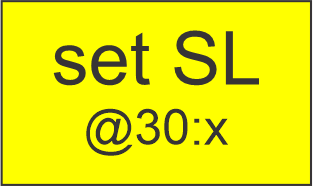
The Stop Loss (SL) Key in the TAQ Magic Keys panel is a trading control that allows traders to quickly set or adjust the stop loss for running trades. A stop loss is a predefined price level at which a trade automatically closes to prevent further loss if the market moves against the position.
Risk management is one of the most important elements of successful trading. Without a stop loss, traders may expose their accounts to significant risk during sudden market movements. The Stop Loss Key simplifies this process by allowing traders to apply stop loss levels quickly using the Magic Keys panel.
Instead of manually opening the order modification window and entering stop loss values, traders can set the stop loss with just a few clicks.
Introduction of the Stop Loss Key
Financial markets can be unpredictable, and price movements can occur rapidly. Because of this, professional traders always use stop losses to control risk. However, setting stop loss levels manually can sometimes be slow and inconvenient, especially when managing multiple trades.
The TAQ Magic Keys Stop Loss Key is designed to make stop loss management faster and easier. With this feature, traders can define their stop loss distance using simple incremental clicks and then apply the stop loss to their running trades instantly.
This feature is particularly useful for scalpers, intraday traders, and high-frequency traders who require quick trade management tools during active market conditions.
Function of the Stop Loss Key
The main function of the Stop Loss Key is to set or adjust the stop loss for running trades using a predefined pip increment system.
The Stop Loss Key works using the following process:
- Each click increases the stop loss distance by 30 pips.
- Traders review the selected stop loss value.
- After confirming the desired stop loss, they press the Enter Button to apply it.
Example of stop loss increments:
- 1st Click = 30 pips
- 2nd Click = 60 pips
- 3rd Click = 90 pips
- and so on in increments of 30 pips (30 : x).
This method allows traders to quickly select their preferred stop loss level before applying it to their active trades.
How to Use the Stop Loss Key
Using the Stop Loss Key in TAQ Magic Keys is simple and efficient.
Step-by-step process:
- Ensure you have an active running trade.
- Click the Stop Loss button on the Magic Keys panel.
- Each click increases the stop loss value by 30 pips.
- Check the final stop loss distance displayed.
- Press the Enter Button to apply the stop loss to the running trade.
Example workflow:
- First click → 30 pips SL
- Second click → 60 pips SL
- Third click → 90 pips SL
Once confirmed, the stop loss will be automatically placed according to the selected pip value.
This allows traders to quickly secure their trades without manually editing the order.
Role of Magic Keys in Trading
Magic Keys are designed to simplify trading actions and improve execution speed. Instead of navigating through multiple trading platform menus, traders can manage important trading functions directly from a dedicated panel.
The Stop Loss Key plays a crucial role in this system because it helps traders manage risk quickly and efficiently. It ensures that trades are protected while allowing traders to focus on market analysis.
For traders operating in fast markets, this level of speed and control can significantly improve trading performance.
Advantages and Challenges
Advantages
- Quick stop loss placement for running trades
- Easy pip-based adjustment system
- Faster trade risk management
- Reduces manual order modification steps
- Improves trading discipline
Challenges
- Incorrect stop loss distance may increase risk
- Traders must choose stop loss levels based on market structure
- Overly tight stop losses may lead to premature trade closure
Using proper market analysis alongside stop loss management is important for effective trading.
Benefits of the Stop Loss Key
The Stop Loss Key provides several key benefits to traders:
- Helps protect trading capital from large losses
- Allows quick adjustment of stop loss levels
- Improves trade management efficiency
- Reduces time spent on manual order modifications
By using the TAQ Magic Keys Stop Loss Key, traders can manage their risk more effectively while maintaining full control over their open trades. This feature ensures that every trade has a defined risk level, helping traders maintain consistent and disciplined trading practices.
Leave a Reply