What is the Sell Key?
The Sell Key in the TAQ Magic Keys panel is a specialized trading shortcut that allows traders to open a sell position instantly with a simple key press. In trading, a sell trade is placed when a trader expects the market price to move downward, allowing the position to be closed later at a lower price for profit.
In traditional trading platforms, opening a sell trade requires several manual steps such as entering lot size, selecting sell order, confirming the trade, and managing stop loss or take profit settings. The Sell Key simplifies this process by allowing traders to execute a sell trade quickly and efficiently directly from the Magic Keys panel.
This key is designed to help traders react faster to market opportunities while reducing the time spent on manual trade execution.
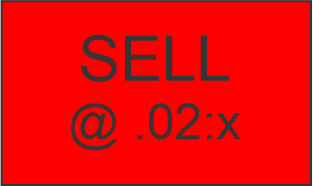
Introduction of the Sell Key
Financial markets such as Forex, Gold, and indices often move rapidly. Traders must be able to enter positions quickly when market conditions match their strategy. Even a small delay in placing a trade can result in missing a profitable opportunity.
The TAQ Magic Keys Sell Key is designed to solve this problem. It allows traders to prepare the trade size quickly and execute the sell order using a dedicated button or key. By removing unnecessary steps, traders can focus on market analysis and decision making instead of navigating through trading platform menus.
This feature is particularly helpful for scalpers and intraday traders, where execution speed plays a crucial role in trade performance.
Function of the Sell Key
The primary function of the Sell Key is to execute a sell trade quickly using predefined lot size settings.
The Sell Key works with a simple lot size selection system:
- Traders select the lot size by clicking the lot size button.
- Each click increases the lot size by 0.02 lots.
- Once the desired lot size is selected, the trader presses the Enter Button to execute the sell trade.
Example:
- 1st Click = 0.02 Lot
- 2nd Click = 0.04 Lot
- 3rd Click = 0.06 Lot
- and so on in increments of 0.02 lots (0.02 : x).
This system allows traders to quickly adjust their trade size before entering the market.
How to Use the Sell Key
Using the Sell Key in TAQ Magic Keys is simple and efficient.
Step-by-step process:
- Open the trading chart.
- Click the lot size selection button.
- Each click increases the lot size by 0.02 lots.
- Confirm the final lot size displayed on the panel.
- Press the Enter Button to execute the sell trade.
Example workflow:
- First click → 0.02 lot
- Second click → 0.04 lot
- Third click → 0.06 lot
After confirming the desired trade size, pressing the Enter Button will instantly place the sell trade in the market.
This process allows traders to control their position size easily while maintaining fast trade execution.
Role of Magic Keys in Trading
Magic Keys are designed to simplify and speed up the trading process. Instead of manually entering orders through multiple windows, traders can manage key trading functions using a dedicated panel.
The Sell Key plays an important role in this system because it allows traders to:
- Execute trades faster
- Adjust lot sizes quickly
- Maintain focus on market analysis
- Reduce mistakes caused by manual order entry
For active traders, this efficiency can significantly improve trading performance.
Advantages and Challenges
Advantages
- Quick sell trade execution
- Simple lot size adjustment system
- Reduces time spent on manual order entry
- Improves trading workflow
- Suitable for fast market conditions
Challenges
- Rapid execution requires disciplined trading decisions
- Incorrect lot size selection can increase risk
- Traders must still follow proper risk management rules
Understanding proper position sizing is important when using fast trade execution tools.
Benefits of the Sell Key
The Sell Key offers several benefits for traders:
- Enables fast entry into downward market opportunities
- Provides quick lot size adjustment before trade execution
- Improves trade management efficiency
- Helps traders maintain focus on strategy rather than platform navigation
By using the TAQ Magic Keys Sell Key, traders can execute sell trades quickly and efficiently while maintaining control over position size and risk management.
Leave a Reply